
▶ Play Grove Keepers in your browser
I build AI products for a living, and I build terminal tools on the side. But I had never built a game. The barrier to entry always felt too high: learning an engine, managing state loops, wrestling with UI canvases, and the inevitable trap of programmer art.
Over the last few weeks, that changed. I built and shipped Grove Keepers, a portrait-mode tower defense game for iOS. And I did it entirely through AI collaboration using Claude Code, Cursor, and Claude Design.
Here is how the workflow actually looked, the false start that almost killed the project, and why building games with AI is ultimately a product management exercise.
The Game: Grove Keepers
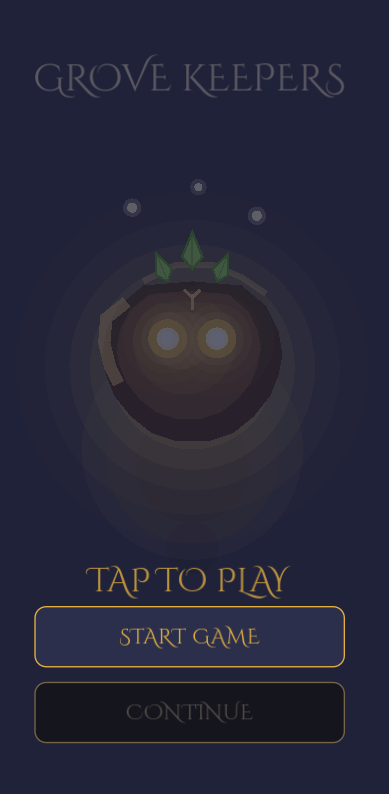
I wanted to build something cozy but strategic. In Grove Keepers, you defend a living grove heart by dragging and dropping magical totems onto an isometric grid. The twist: you do all your placement before the wave begins. Once the shadow creatures spawn, combat auto-resolves. You watch, learn, and collect seeds to permanently upgrade the grove across 20 visual tiers.
The target mood was "candlelit forest at dusk." No stressful real-time twitch mechanics. Just thoughtful placement, a parchment-on-twilight aesthetic, and a satisfying progression loop.
The False Start: AI Ergonomics in Unity
I started the project in Unity 6 LTS. It's the industry standard, so it felt like the obvious choice. But I quickly ran into a wall, and it wasn't Unity's fault, it was a problem of AI ergonomics.
Unity is a highly visual, editor-first environment. To let Claude Code work in Unity, I had to run a local MCP (Model Context Protocol) server. When I wanted the AI to wire up a health bar, it couldn't just edit a text file. It had to send a JSON RPC call to the MCP server to search the scene, find the GameObject, and inject a serialized property change.
It felt like doing surgery through a keyhole using a robotic arm with lag. It was fragile. The AI would lose context, hallucinate GameObject names, or fail to apply prefab overrides.
I realized something fundamental about the current generation of AI coding:
AI models are text-in, text-out prediction engines. If your tools aren't plain text, you are fighting the medium.
I pivoted to Godot 4. Godot's scene files (.tscn) are just plain text. An LLM can read the entire scene tree, understand the node hierarchy, and edit UI anchors directly in text. The friction vanished overnight. The pivot wasn't an engine preference; it was an architecture decision to align with how my "co-founder" actually thinks.
Avoiding "Programmer Art" with Claude Design
The easiest way to ruin a good indie game is with inconsistent visual language. Four different fonts, arbitrary button sizes, and a rainbow of hex codes. I wanted Grove Keepers to feel intentional.
Instead of hacking together UI canvases, I treated Claude like a Senior UI/UX Designer. I wrote a massive, structured brief (DESIGN_MOCK_PROMPT.md). I didn't ask for "a shop menu." I gave it constraints:
- Hard Canvas: 1080x1920 reference resolution only.
- Locked Palette: A strict list of 20 named tokens (e.g.,
CANVAS_DUSK_DEEP,GLOW_AMBER,ALERT_EMBER). No new hex codes allowed. - Strict Typography: Cinzel Decorative for headers, Nunito for body. Only 8 specific sizes.
- 8pt Grid: All spacing must be multiples of 8.
The result was a beautiful 9-state SVG mockup set. Claude Design handed back pixel-perfect specs: empty placement states, tutorial overlays, shop card variations, and failure screens. All unified under one visual identity.
The Implementation: Coding with Cursor Rules
Having a design is one thing. Stopping the AI from butchering it during implementation is another.
To implement the UI in Godot, I used Cursor. But I didn't just paste screenshots into the chat. I wrote a strict, auto-loaded Cursor rule (.cursor/rules/ui-rebuild-workflow.mdc) that forced the AI to follow a rigorous protocol:
- Read the Architecture: Always check
UITheme.gdandPalette.gdfirst. - No Magic Numbers: If you need padding, use
UITheme.SP_16. If you need a color, usePalette.GLOW_AMBER. Zero tolerance for raw hex codes. - One State Per Commit: Migrate one design state at a time. Do not try to build the whole HUD at once.
I handed the AI an IMPLEMENTATION_HANDOFF.md document with the SVG mocks and the exact X/Y coordinates from the design phase. Cursor wrote the GDScript, wired the Godot signals, and built the UI overlays exactly to spec.
The PM Skill Is Still the PM Skill
Here is the reality of building a game with AI in 2026: The AI did not make Grove Keepers. I made Grove Keepers. The AI just typed the code incredibly fast.
The hardest parts of this project weren't writing C# or GDScript. The hardest parts were:
- Designing an economy scaling formula (
EconomyConfig.gd) that felt rewarding at wave 3 and wave 25. - Deciding that failure should give you 60% consolation seeds instead of 0%, so the player never feels punished.
- Structuring a centralized
EventBusso theWaveManagerandEconomyManagerdidn't turn into spaghetti code. - Maintaining a living
ARCHITECTURE.mddocument so the AI never lost the plot of the codebase.
The AI removes the syntax barrier, but it amplifies the architecture barrier. If your product specs and data flows are sloppy, the AI will just build you a sloppy mess at lightspeed.
Grove Keepers works because I treated it like a product. I defined the constraints, managed the state machine, and held the creative vision. The AI was the ultimate execution engine.
You can't prompt your way out of knowing what to build. But if you know exactly what you want, there has never been a better time to build it.