I've always been curious about self-hosted AI assistants. As a PM at Google working on Search AI Mode, I spend my days thinking about how people interact with AI. But I wanted something for my personal use. Something that lived on my machine, connected to the apps I already use.
That's where OpenClaw comes in.
For those who haven't seen it, OpenClaw is a self-hosted gateway that bridges chat apps (Discord, Telegram, WhatsApp, iMessage) to AI agents. You message an AI from anywhere and it actually does things. Runs code. Checks calendar. Controls smart home devices.
This is how I got it running on Windows via Docker, and the decisions I made along the way.
The Setup
OpenClaw on Windows + Docker. The docs are solid, and they recommend openclaw onboard for guided setup. But I wanted something more interactive.
So I used Claude Code (Anthropic's CLI agent) to help spin up the Docker Compose environment. Honestly? Game-changer. Instead of manually editing YAML and hoping for the best, I just talked through what I wanted with an AI that could actually execute commands.
Why Docker Compose? Portability and isolation. If something breaks, I nuke the container and start fresh without touching my system. Plus, all the config stays in one place.
Security and File Isolation
One thing that made me pause early on: OpenClaw needs a workspace directory for config, memory, sessions. By default this lives inside the container. But I wanted it on my host so I could actually read and edit the files.
The solution was volume mounting the workspace:
volumes:
  - ./workspace:/home/node/.openclaw/workspace
Here's the thing, if you're mounting volumes, know what you're exposing. The workspace can contain API keys and session history. I set up a separate .env file outside the repo (added to .gitignore) and passed secrets via environment variables, not hardcoded in config.
The Gateway UI
First time I started the gateway, I had no idea what was going on. Logs streaming, processes running, but no visible feedback.
Then I discovered the Control UI. Run openclaw web and it spins up a local dashboard at http://localhost:8080. This is where you can:
- See active sessions
- Chat directly with your agent
- Edit config in real-time
- Check what's running
Sounds small, but it was crucial for debugging.
The Agent Architecture Question
OpenClaw supports multiple patterns:
- Single agent: one "Jeeves" handling everything
- Multiple agents: different agents for different purposes
- Sub-agents: spawning isolated sessions for specific tasks
For my use case (personal assistant for coding, writing, random tasks), I went with a single main agent with sub-agent capability for heavy-lifting tasks. I named him Jeeves.
Jeeves in Discord
Once the gateway was live, I connected Discord and gave Jeeves a first real task: audit my portfolio site. One message in, one minute later, a full report — broken internal links, duplicate HTML, bad social URLs, missing security attributes on external links.
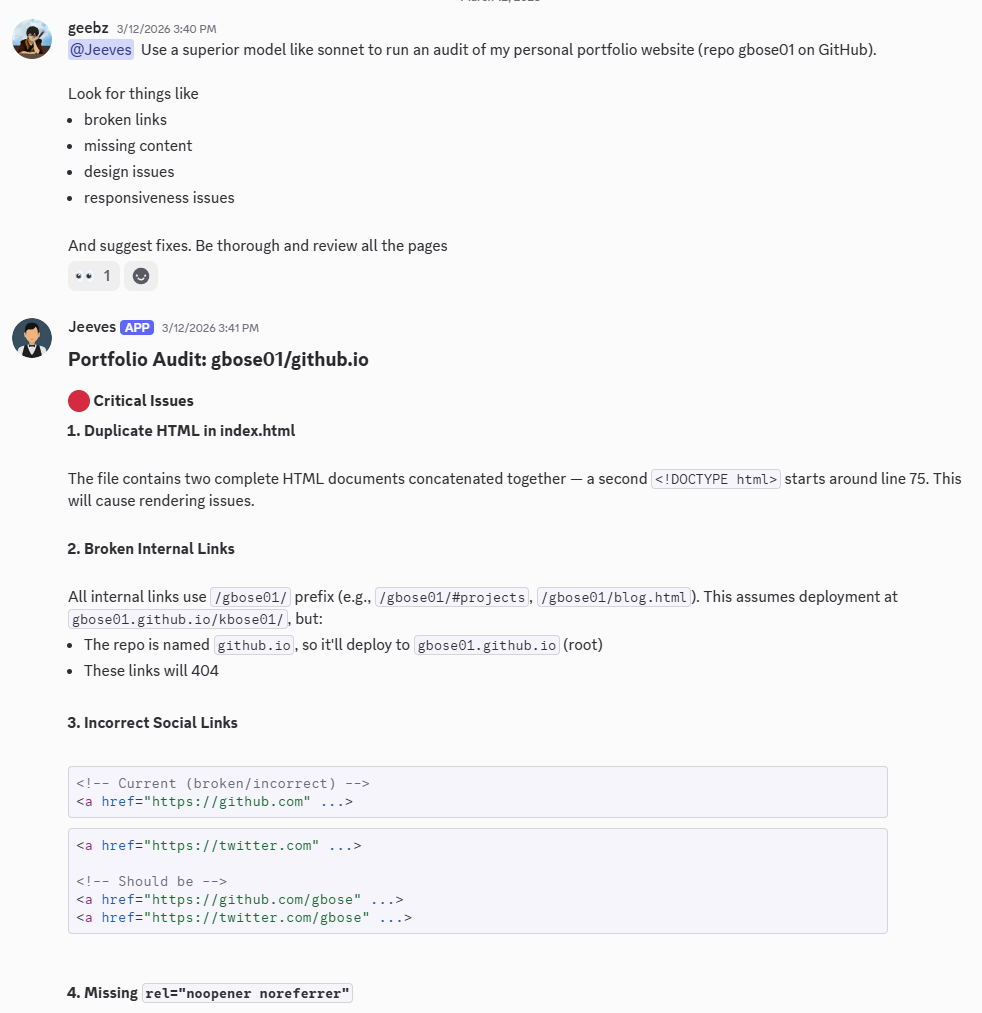
That was the moment the setup stopped feeling like infrastructure and started feeling like having a staff engineer on call. Same agent, same workspace, reachable from whatever app I'm already in.
Model Selection
| Model | Quality | Speed | Cost | When to use |
|---|---|---|---|---|
| Haiku 3.5 | Good enough | Fast | Cheap | Simple queries |
| Sonnet 4 | Solid | Moderate | Moderate | Daily driver |
| Opus 4 | Best | Slower | Expensive | Complex reasoning |
My setup: Default to Sonnet 4 for daily use. Switch to Opus 4 for writing or complex tasks.
What I Learned
- The tools are ready. Self-hosted AI assistants aren't science fiction anymore.
- The real work is configuration. 90% of the time is deciding how you want it to behave.
- Context is everything. Be deliberate about what stays in the context window.
- Windows + Docker is fine. Once it's running, it Just Works.
Next up: actually using this thing. More on that soon.